Saudi Arabia · UAE · Qatar · Kuwait · Oman · Bahrain
Cheque printing software for GCC businesses
One cheque system for every Gulf company you run. Print on any GCC bank's cheque leaf, write the amount in English or Arabic, and keep each country's companies and accounts in one place.
Country by country
Print on the cheques your Gulf banks issue
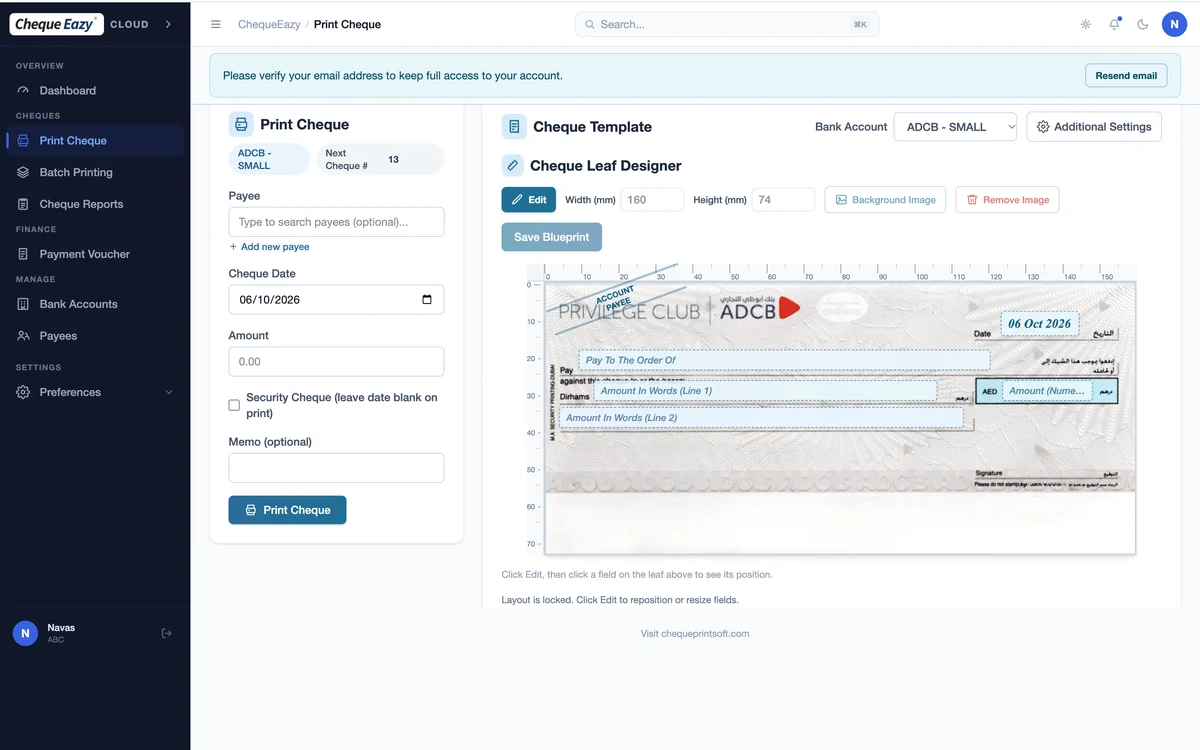
UAE banks have ready-made layouts. For banks in the other five countries, you lay out your cheque leaf once with the designer, or let Enterprise detect it from a scan.
United Arab Emirates
Ready-made layouts for ADCB, Dubai Islamic Bank, Emirates Islamic, Commercial Bank of Dubai, HSBC, Bank of Sharjah and more. See UAE banks.
Saudi Arabia
Lay out cheques from banks such as Al Rajhi Bank, Saudi National Bank, Riyad Bank, Saudi Awwal Bank and Banque Saudi Fransi, with the amount in Arabic words.
Qatar
Lay out cheques from banks such as QNB, Commercial Bank, Doha Bank, Qatar Islamic Bank and Masraf Al Rayan.
Kuwait
Lay out cheques from banks such as National Bank of Kuwait, Kuwait Finance House, Gulf Bank and Burgan Bank.
Oman
Lay out cheques from banks such as Bank Muscat, Bank Dhofar, National Bank of Oman and Sohar International.
Bahrain
Lay out cheques from banks such as National Bank of Bahrain, Bank of Bahrain and Kuwait, and Bahrain Islamic Bank.
Built for Gulf finance teams
Rent, salary and supplier cheques, still printed every month
Post-dated cheques remain part of how the Gulf pays rent, settles with suppliers and secures loans. ChequeEazy prints them accurately and keeps track of every one until it clears.
- Batch print a year of post-dated cheques at fixed intervals
- PDC reminders before issued and received cheques fall due
- Amount in words in English or Arabic
- Payment and receipt vouchers printed with each cheque
- Separate companies, users and approvers per country
- Reports by date, payee and bank for reconciliation
Choose an edition
Desktop, Cloud or Enterprise
Desktop
Install on one Windows PC and pay once. Data stays on your machine. Explore Desktop.
Cloud
Print from any browser in any GCC office, with automatic backups and an optional Arabic interface. Explore Cloud.
Enterprise
For real estate: scan any client's cheque, let Ai detect the layout, and print. Explore Enterprise.
FAQ
GCC questions
Does ChequeEazy work outside the UAE?
Yes. We support businesses in all six GCC countries: Saudi Arabia, the UAE, Qatar, Kuwait, Oman and Bahrain. ChequeEazy Cloud runs in any browser, and ChequeEazy Desktop installs on any Windows 10 or 11 PC.
My bank isn't in the ready-made library. Can I still print?
Yes. Ready-made layouts cover UAE banks. For any other GCC bank, place the date, payee and amount fields on your own cheque leaf with the layout designer and save it as a reusable blueprint. With ChequeEazy Enterprise, you scan the leaf and Ai detects the layout for you.
Can I print the amount in words in Arabic?
Yes. ChequeEazy writes the amount in words in English or Arabic. The Cloud + Arabic plan adds a full Arabic interface and right-to-left cheque layouts.
Can one account handle companies in several GCC countries?
Yes. ChequeEazy is multi-company and multi-user, so a group can keep each country's companies, bank accounts and payees separate under one account.
What hours is support available?
Our team is in Dubai and answers Monday to Friday, 9:00 to 18:00 Gulf Standard Time, by phone, email and WhatsApp. That is the same time zone as Oman and one hour ahead of Saudi Arabia, Qatar, Kuwait and Bahrain.
Other regions
Cheque printing across the region
UAE
Ready-made UAE bank layouts, rent PDCs and security cheques
Cheque printing software for the UAEMiddle East (Arabic)
Bilingual cheques with the amount in Arabic words
Cheque printing software for the Middle EastIndia
CTS-2010 cheques for SBI, HDFC, ICICI and any Indian bank
Cheque printing software for IndiaEgypt
Arabic cheques for National Bank of Egypt, Banque Misr and CIB
Cheque printing software for EgyptPrint your first GCC cheque today
Bring a cheque leaf from your bank and we'll set up its layout with you on a demo call.